Showing posts with label C#. Show all posts


How To Determine The Generated SQL Queries In Entity Framework 4

With the help of Entity Framework, you may never write a single SQL Query code in your programming projects. Some of the benefits of Entity framework include:

  1. Visual Studio intellisense
  2. Compile checking
  3. Faster development
  4. Auto generated domain objects
  5. Lazy loading, etc.

However, sometimes you need to know how Entity Framework translates your LINQ Query into a SQL Query. You can't just trust the framework to correctly formulate the Query. If you are concerned about scalability and performance, you need to check and analyze the underlying query and if possible modify or refine it to increase querying speed and performance.

The easiest way to view the generated SQL is to use a profiler tool that's included in database management tools (for instance, SQL Server Manangement Studio). Using this tool, you can monitor all SQL statements executed against the database. But using this tool requires that you have access to the database. Fortunately, with Entity Framework 4, you can use ObjectSet class's ToTraceString method. 

Here's the example code on how to do it in C# and VB.NET: 


C#:

var result = ctx.Orders.Where(o => o.Date.Year == DateTime.Now.Year);
var SQL = (result as ObjectQuery).ToTraceString();


VB:
Dim result = ctx.Orders.Where(Function(o) o.Date.Year = DateTime.Now.Year)
Dim SQL = TryCast(result, ObjectQuery).ToTraceString() 


Convert SQL to LINQ

LINQ (Language Integrated Query) is Microsoft's technology that provides .NET languages the capability to query data of all types. These types include in-memory arrays and collections, databases, XML documents, and more.

LINQ is such a vast topic that you will be better off learning comprehensively by buying a book on this superb technology. I'd highly recommend Steve Eichert's and Fabrice Marguerie's "LINQ in Action" book available in Amazon.


In this post, I'll provide examples for converting SQL queries into LINQ (in VB.NET and C#).
These samples are taken from VB Team's blog: http://blogs.msdn.com/b/vbteam/archive/tags/converting+sql+to+linq/default.aspx. Since all their samples are in VB.NET, I'll include C# for completeness.

SELECT * Query

SQL
SELECT *
FROM CustomerTable
LINQ(VB.NET)
From Contact In CustomerTable
LINQ(C#)
from Contact in CustomerTable
select Contact


SELECT Query

SQL
SELECT Name CustomerName, CustomerID ID
FROM Customers
LINQ(VB.NET)
From cust In Customers _
Select CustomerName = cust.Name, ID = cust.CustomerID _
Order By ID
LINQ(C#)
from cust in Customers
select new(){CustomerName=cust.Name, ID=cust.CustomerID }


SELECT... WHERE Query
SQL
SELECT * FROM CustomerTable
WHERE State = “WA”
LINQ(VB.NET)
From Contact In CustomerTable _
Where Contact.State = “WA”
LINQ(C#)
from Contact in CustomerTable
where Contact.State=="WA"
select Contact


SELECT DISTINCT Query
SQL
SELECT DISTINCT Name, Address
FROM CustomerTable
LINQ(VB.NET)
From Contact In CustomerTable _
Select Contact.Name, Contact.Address _
Distinct
LINQ(C#)
(from Contact in CustomerTable
select new(){Contact.Name,Contact.Address}).Distinct()


AND Operator Query
SQL
SELECT * FROM CustomerTable
WHERE City = “Seattle” AND Zip = “98122”
LINQ(VB.NET)
From Contact In CustomerTable _
Where Contact.City = “Seattle” And Contact.Zip = “98122”
LINQ(C#)
from Contact in CustomerTable
where Contact.City=="Seattle" && Contact.Zip=="98122"
select Contact


BETWEEN Operator Query
SQL
SELECT * FROM OrderTable
WHERE OrderDate BETWEEN ‘Sept-22-2007’ AND ‘Sept-29-2007’
LINQ(VB.NET)
From Shipment In OrderTable _
Where (Shipment.OrderDate > #9/22/2007#) _
    And (Shipment.OrderDate < #9/29/2007#)
LINQ(C#)
from Shipment in OrderTable
where Shipment.OrderDate > new Date(2007,9,22) && 
Shipment.OrderDate <  new Date(2007,9,29)
select Shipment


Order By Query
SQL
SELECT * FROM CustomerTable
ORDER BY Phone
LINQ(VB.NET)
From Contact In CustomerTable _
Order By Contact.Phone
LINQ(C#)
from Contact in CustomerTable
orderby Contact.Phone
select Contact


Order By ASC/DESC Query
SQL
SELECT * FROM CustomerTable
ORDER BY Phone ASC, Name DESC
LINQ(VB.NET)
From Contact In CustomerTable _
Order By Contact.Phone Ascending, Contact.Name Descending
LINQ(C#)
from Contact in CustomerTable
orderby Contact.Phone ascending, Contact.Name descending
select Contact

I'll update this blog later and add more samples...


ClickBank API in C#


Founded in 1998, ClickBank is a secure online retail outlet for more than 50,000 digital products and 100,000 active affiliate marketers. Just like Paypal, you can use ClickBank in your websites to handle payment transactions for your customers.

ClickBank publishes an API (a set of programming rules and specifications) for properly using their services. You can read about their API in http://www.clickbank.com/help/account-help/account-tools/clickbank-api/.

The current version of ClickBank’s Service API is: 1.2 and it uses REST for communication through the internet. ClickBanks provide example in C# but it's not detailed and hard to grasp especially if you're still new to REST.


In order to access their API, first you need the Clerk API key and the Developer Key. These keys are used for authorization and security so you must keep these in private and not show these keys to other people.

To acquire Developer and Clerk API keys, simply login to your ClickBank account and go to the Account Settings tab. Then, click “edit” in the Developer and Clerk API Key areas. Each key must be approved, present, and active for successful authentication to occur.

In one of our projects, we use ClickBank's API for determining if a customer's subscription is active and for canceling a customer's subscription.

Determining If A Customer Is Active

To determine if a user is active, you need to use the Orders API. This API's specification is published in https://api.clickbank.com/rest/1.2/orders. And here's how I've coded it in a C# procedure.


private bool IsClickBankAccountActive(string transactionId)
{
             //get authorization key string
            string authorizationKey = "DEV-A32" + ":"
               + "API-1SE";

            //set base uri
            Uri clickBankBaseUri = new Uri(_configuration.ClickBankRestUrl);

            //set uri template
            UriTemplate clickBankUriTemplate = new UriTemplate("/1.2/orders/{receipt}");

            //set complete uri
            Uri clickBankTicketUri = clickBankUriTemplate.BindByPosition(
                clickBankBaseUri, transactionId);

            //create request
            HttpWebRequest request = (HttpWebRequest)WebRequest.Create(
                clickBankTicketUri);
            request.Accept = "application/xml";
            request.Headers.Add(HttpRequestHeader.Authorization, authorizationKey);
            request.Method = "HEAD";

            HttpWebResponse response = null;

            //get response
            try
            {
                response = (HttpWebResponse)request.GetResponse();
                HttpStatusCode c = response.StatusCode;
                if (c == HttpStatusCode.NoContent)
                {
                    return true;
                }
                else
                {
                    return false;
                }
            }
            catch
            {
                return false;
            }

        }
}


Canceling A Customer's Subscription

To cancel a customer's subscription, you need to use the Tickets API. This API's specification is published in https://api.clickbank.com/rest/1.2/tickets.

When you call this Ticket API, it returns a data that determines the status of Ticket and other relevant info.
I've created a TicketData class for representing the data that is returned.

Here's the TicketData class:


public class TicketData
{
        public enum StatusOfTicket
        {
            OPEN = 0,
            REOPEN = 1,
            CLOSED =2
        }

        public enum TypeOfTicket
        {
            TECH_SUPPORT = 0,
            REFUND =1,
            CANCEL=2,
            ORDER_LOOKUP=3,
            ESCALATED=4,
            APPROVAL_AD=5,
            APPROVAL_IMAGE=6,
            APPROVAL_UPSELL=7,
            APPROVAL_CATEGORY_CHANGE=8,
            APPROVAL_MAX_PRICE=9,
            APPROVAL_BLOG_POST=10,
            APPROVAL_PRODUCT=11,
            CATEGORY_SUGGESTION=12,
            BUSINESS_DEVELOPMENT=13,
            ACCT_QUESTION_MARKETING=14,
            ACCT_QUESTION_ACCOUNTS=15,
            ACCT_QUESTION_ACCOUNTING=16,
            APPROVAL_GENERIC=17,
            SPAM=18,
            ABUSE=19

        }

        public int TicketId
        { get; set; }

        public string Receipt
        { get; set; }

        public StatusOfTicket TicketStatus
        { get; set; }

        public TypeOfTicket TicketType
        { get; set; }

}


Also, when cancelling a customer, the API requires a reason on why it's cancelled.
I've coded the reasons in a Dictionary:

//Dictionary for determining cancellation reasons
public Dictionary<string, string> GetCancellationReasons()
{
   Dictionary<string, string> reasons = new Dictionary<string, string>();
   reasons.Add(CancellationReason.ticket_type_cancel_1.ToString(), 
     "I did not receive additional value for the recurring payments");
   reasons.Add(CancellationReason.ticket_type_cancel_2.ToString(), 
     "I was not satisfied with the subscription / Subscription " + 
     "did not meet expectations");
   reasons.Add(CancellationReason.ticket_type_cancel_3.ToString(), 
     "I was unable to get support from the vendor");
   reasons.Add(CancellationReason.ticket_type_cancel_4.ToString(), 
     "Product was not compatible with my computer");
   reasons.Add(CancellationReason.ticket_type_cancel_5.ToString(), 
     "I am unable to afford continuing payments for this subscription");
   reasons.Add(CancellationReason.ticket_type_cancel_6.ToString(), 
     "I did not realize that I accepted the terms for continuing payments");
   reasons.Add(CancellationReason.ticket_type_cancel_7.ToString(), 
     "Other");
   return reasons;
}


And here's the code for cancelling the user's subscription:


//this procedure cancel's the subscription of a customer
public TicketData CancelSubscription(
   string ReceiptNo,CancellationReason reason, String Comment)
{
           
  TicketData responseTicket = null;

  //get cancel reason string
  string cancelReason = reason.ToString().Replace('_', '.');

  //get cancel type string
  string cancelType = CancellationType.cncl.ToString();
            
  //get authorization key string
  string authorizationKey = "DEV-A32" + ":"
     + "API-1SE8";
            
  string cancelComment = string.IsNullOrEmpty(Comment) ? Comment : string.Empty;
            
  //set base uri
  Uri clickBankBaseUri = new Uri(_configuration.ClickBankRestUrl);
            
  //set uri template
  UriTemplate clickBankUriTemplate = new UriTemplate(
   "/1.2/tickets/{receipt}/?type={type}&reason={reason}&comment={comment}");
            
  //set complete uri
  Uri clickBankTicketUri = clickBankUriTemplate.BindByPosition(
     clickBankBaseUri, ReceiptNo, cancelType, cancelReason, cancelComment);

  //create request
  HttpWebRequest request = (HttpWebRequest)WebRequest.Create(
    clickBankTicketUri);
  request.Accept = "application/xml";
  request.Headers.Add(HttpRequestHeader.Authorization, 
    authorizationKey);
  request.Method = "POST";

  HttpWebResponse response = null;

 //get response
 try
  {
     response = (HttpWebResponse)request.GetResponse();
     string responseMessage = string.Empty;

     //Get Stream Response
     using (StreamReader reader = new
      StreamReader(response.GetResponseStream()))
     {
       responseMessage = reader.ReadToEnd();
     }

     //Parse Response using XDOCUMENT
     if (!string.IsNullOrEmpty(responseMessage))
     {
        XDocument document = XDocument.Parse(responseMessage);

        responseTicket = new TicketData();

        responseTicket.TicketId = Convert.ToInt32(document.Element(
           "ticketData").Element("ticketid").Value);
        responseTicket.Receipt = document.Element(
           "ticketData").Element("receipt").Value;
        responseTicket.TicketStatus = (
           Ncf.InsideEdge.Model.TicketData.StatusOfTicket)
           Enum.Parse(typeof(
           Ncf.InsideEdge.Model.TicketData.StatusOfTicket), 
            document.Element(
             "ticketData").Element("status").Value, true);
             responseTicket.TicketType = 
             (Ncf.InsideEdge.Model.TicketData.TypeOfTicket)Enum.Parse(
             typeof(Ncf.InsideEdge.Model.TicketData.TypeOfTicket),
              document.Element(
             "ticketData").Element("type").Value, true);
     }

     }
     catch
     {

     }

    //check response ticket
    if (responseTicket != null && responseTicket.Receipt == ReceiptNo
         && responseTicket.TicketType ==
         Ncf.InsideEdge.Model.TicketData.TypeOfTicket.CANCEL)
    {
        return responseTicket;
    }
    else
    {
        return null;
    }
  }
 }


I hope you find my article useful and it's able to help you understand better how to use RESTFUL Services, specifically the ClickBank API Service.


Personal Homepage Using ASP.NET WITH C#

This project uses ASP.NET 3.5 with C#. I have used SQL SERVER 2005 EXPRESS as the backend data provider. I've used a little bit of Domain Driven Design in order to have separation between the repository, services, and presentation logic. I've also used Inversion Of Control, implemented using Structure Map to reduce dependency between the classes.

In this project, I've also used CSS3 feaures for rounding corners and if you're viewing it on browsers not supporting these new features, you will only see rectangle corners.

This project has  blogging , photo album, chatting, video, and RSS features.


ABOUT PAGE
   - Displays information about this website


ABOUT-PROFILE PAGE
   - Displays information about my profile


BLOGS-BLOG CONTENT PAGE
   - Displays my blog content.


BLOGS-BLOG LIST PAGE
   -Displays list of blogs


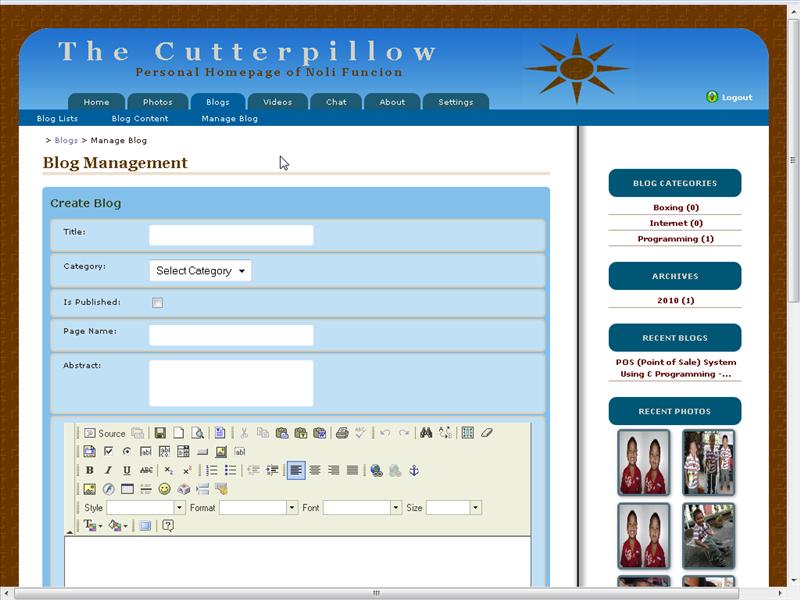
 BLOGS-MANAGE BLOG PAGE
    -Allows me to manage my blog.


BLOGS PAGE
   - Displays a list of blogs by category.


CHAT PAGE
   -Asks a user for a chat name before the user can use the chat room.


CHAT-CHAT ROOM PAGE
   - Allows users to chat.


CHAT-CONTACT PAGE
   - Allows users to send me a message.


HOME PAGE
   - Displays the home page of the website.


HOME-LOGIN PAGE
   - allows the user to log-in.


HOME-WALL PAGE
   - Displays my wall.


 PHOTOS PAGE
   -Displays the photo albums.


PHOTOS - ALBUM PHOTOS
  - Displays the photos in the album.


PHOTOS - MANAGE PHOTOS PAGE
    -Allows me to add and edit photos.


PHOTOS - SINGLE PHOTO PAGE
   -Displays a single photo.


SETTINGS PAGE
   - Allows me to set the website settings.


SETTINGS-ACCOUNT PAGE
   - Allows me to set my account settings.


 SETTINGS - PROFILE PAGE
   - Allows me to set my  Profile Settings.


Enrollment System Using ASP.NET IN C#

This is my project for ASP.NET with C#. This project uses 3-tier and 3-layer architecture to separate the presentation logic, database logic and the business logic of the application.


ENROLLMENT - STEP1 ( REGISTRATION)
    - Student submits registration for enrollment.


ENROLLMENT - STEP2 ( REGISTRAR APPROVAL)

    - Registrar approves the submitted registration record.


ENROLLMENT - STEP3 ( CLASS SELECTION )
    - Student selects class schedules.


ENROLLMENT - STEP4 ( ADVISER APPROVAL )

    - Adviser approves class selection record of student.


ENROLLMENT - STEP5 ( ASSESSOR APPROVAL )
    - Assessor assesses enrollment fees.


ENROLLMENT - STEP6 ( CASHIER APPROVAL)

    - Cashier receives enrollment payment.


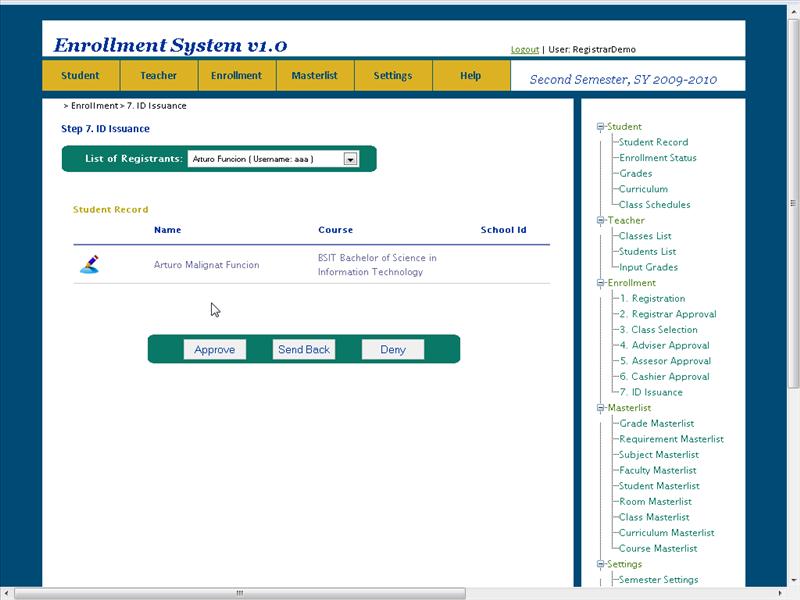
ENROLLMENT - STEP7 ( ID ISSUANCE)

    - Registrar issues ID Number to new student.


HELP - ABOUT

    - Displays information about this website.


HELP - DEMO

    - Allows the user to have a demo of the software.


MASTERLIST -CLASS MASTER LIST

    - Displays information about the class master list.


MASTERLIST -COURSE MASTER LIST

    - Displays information about the course master list.


MASTERLIST -CURRICULUM MASTER LIST

    - Displays information about the curriculum master list.


MASTERLIST -FACULTY MASTER LIST

    - Displays information about the faculty master list.


MASTERLIST -GRADE MASTER LIST

    - Displays information about the grade master list.


MASTERLIST -REQUIREMENT MASTER LIST

    - Displays information about the requirement master list.


MASTERLIST -ROOM MASTER LIST

    - Displays information about the room master list.


MASTERLIST -STUDENT  MASTER LIST

    - Displays information about the student master list.


MASTERLIST -SUBJECT MASTER LIST

    - Displays information about the subject master list.


SETTINGS-ACCOUNTS

    - Allows website admin to set-up user accounts.


SETTINGS-ACCOUNTS-CREATE ACCOUNTS
    - Allows website admin to create user accounts.


SETTINGS-ACCOUNTS-CREATE ROLES
    - Allows website admin to create user account roles.


SETTINGS-ACCOUNTS
    - Allows website admin to set-up curriculum settings.


SETTINGS-DAY SETTINGS
    - Allows website admin to set-up day settings.


SETTINGS-PERIOD SETTINGS
    - Allows website admin to set-up period settings.


SETTINGS-SCHEDULE SETTINGS
    - Allows website admin to set-up schedule settings.


SETTINGS-SEMESTER SETTINGS
    - Allows website admin to set-up semester settings.


SETTINGS-TIME SETTINGS
    - Allows website admin to set-up time settings.


SETTINGS-YEAR SETTINGS
    - Allows website admin to set-up time year settings.


STUDENT -CLASS SCHEDULES

    - Displays information about the student's current class schedules.


STUDENT -CURRICULUM

    - Displays information about the student's course curriculum.


STUDENT -ENROLLMENT STATUS

    - Displays information about the student's enrollment status.


STUDENT -GRADES

    - Displays information about the student's grades.


STUDENT -STUDENT RECORD

    - Displays information about the student's account.


STUDENT -CLASSES LIST

    - Displays information about the student's current class schedules.


TEACHER -INPUT GRADES

    - Used by teacher to input grades.